
Base Tables for | Order to Cash (O2C) Cycle in Oracle
1. Order Entry
1. Order Entry
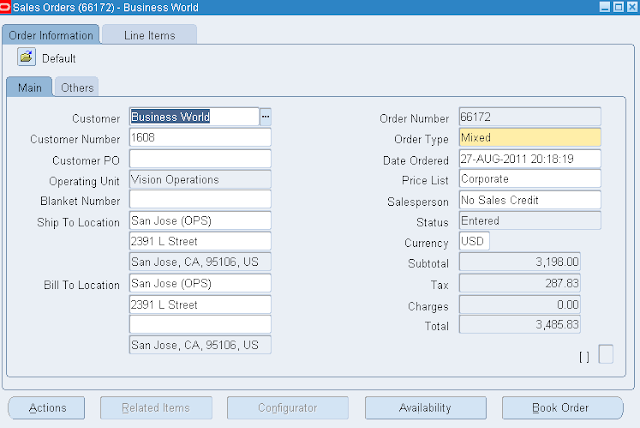
This is the first stage where Order is entered into the system. It creates a record in Headers table and Lines table
OE_ORDER_HEADERS_ALL:
This table stores the Header Information of the Sales Order
Important columns in this table:
HEADER_ID: Unique system generated ID
ORG_ID, ORDER_NUMBER, SHIP_FROM_ORG_ID, SHIP_TO_ORG_ID and FLOW_STATUS_CODE
At the time of Order Entry, the FLOW_STATUS_CODE is ‘Entered’
Sample code:
SELECT HEADER_ID, ORG_ID, ORDER_TYPE_ID, FLOW_STATUS_CODE, TRANSACTIONAL_CURR_CODE, SHIPPING_METHOD_CODE, SHIP_FROM_ORG_ID, SHIP_TO_ORG_ID FROM OE_ORDER_HEADERS_ALL WHERE ORDER_NUMBER= 66405;
OE_ORDER_LINES_ALL:
This table stores the Line Information of the Sales Order
Important columns of this table
LINE_ID: Unique system generated ID
HEADER_ID: It is the link between OE_ORDER_HEADERS_ALL and OE_ORDER_LINES_ALL
ORDERED_ITEM, INVENTORY_ITEM_ID, PRICING_QUANTITY, ORDERED_QUANTITY, FLOW_STATUS_CODE and UNIT_SELLING_PRICE_PER_PQTY
Sample code:
SELECT LINE_ID FROM OE_ORDER_LINES_ALL WHERE HEADER_ID= 190452;
SELECT ORDERED_ITEM, INVENTORY_ITEM_ID, PRICING_QUANTITY, ORDERED_QUANTITY, FLOW_STATUS_CODE, UNIT_SELLING_PRICE_PER_PQTY FROM OE_ORDER_LINES_ALL WHERE LINE_ID= 388401;
2. Order Booking
Order Booking is the final stage in the Sales Order entry. Now that the Order Entry process is complete and that the order is eligible for the next stage in the line flow for this order, as defined by its Transaction Type. By clicking Book Order button, the Order is booked.
OE_ORDER_HEADERS_ALL
OE_ORDER_LINES_ALL
WSH_DELIVERY_DETAILS
When the Order is Booked, the FLOW_STATUS_CODE in OE_ORDER_HEADERS_ALL would be ‘BOOKED’ and the FLOW_STATUS_CODE in OE_ORDER_LINES_ALL would be ‘AWAITING_SHIPPING’
RELEASED_STATUS in WSH_DELIVERY_DETAILS would be ‘R’ (means- ready to release)
Important columns of WSH_DELIVERY_DETAILS table:
DELIVERY_DETAIL_ID: Unique system generated id with reference to SOURCE_HEADER_ID (it is the HEADER_ID from OE_ORDER_HEADERS_ALL)
SOURCE_HEADER_ID: It is the HEADER_ID generated from OE_ORDER_HEADERS_ALL
SOURCE_LINE_ID: It is the LINE_ID generated from OE_ORDER_LINES_ALL
RELEASED_STATUS, SOURCE_CODE, CUSTOMER_ID, INVENTORY_ITEM_ID, SHIP_FROM_LOCATION_ID, SHIP_TO_LOCATION_ID, MOVE_ORDER_LINE_ID, REQUESTED_QUANTITY, SHIPPED_QUANTITY, SUBINVENTORY, SHIP_METHOD_CODE etc.
Sample Code:
SELECT DELIVERY_DETAIL_ID, SOURCE_HEADER_ID, SOURCE_LINE_ID, SOURCE_CODE, CUSTOMER_ID, INVENTORY_ITEM_ID, ITEM_DESCRIPTION, SHIP_FROM_LOCATION_ID, SHIP_TO_LOCATION_ID, MOVE_ORDER_LINE_ID, REQUESTED_QUANTITY, SHIPPED_QUANTITY, SUBINVENTORY, RELEASED_STATUS, SHIP_METHOD_CODE, CARRIER_ID FROM WSH_DELIVERY_DETAILS WHERE SOURCE_HEADER_ID= 190452;
3. Launch Pick Release:
Pick release is the process by which the items on the sales order are taken out from inventory. This process allocates on-hand inventory to your order and inform the warehouse personnel to move the item from inventory to the shipping staging area. Once your item is in the shipping staging area, it is ready to be shipped.
OE_ORDER_LINES_ALL: Here the FLOW_STATUS_CODE should be ‘PICKED’ or ‘AWAITING_SHIPPING’ depending on Auto Pick Confirm (set to No or Yes)
WSH_DELIVERY_DETAILS: Here RELEASED_STATUS should be ‘S’ (Submitted for Release) or ‘Y’ (Pick Confirmed). These values again depend on the parameters given at Auto Pick Confirm (set to No or Yes)
WSH_DELIVERY_ASSIGNMENTS: DELIVERY_ID is populated here (from DELIVERY_DETAIL_ID with reference to WSH_DELIVERY_DETAILS table)
Sample Code:
SELECT DELIVERY_DETAIL_ID FROM WSH_DELIVERY_DETAILS WHERE SOURCE_HEADER_ID= 190452;
SELECT DELIVERY_ASSIGNMENT_ID, DELIVERY_ID, PARENT_DELIVERY_ID, DELIVERY_DETAIL_ID, PARENT_DELIVERY_DETAIL_ID, CREATION_DATE, CREATED_BY, LAST_UPDATE_DATE, LAST_UPDATED_BY, ACTIVE_FLAG, TYPE FROM WSH_DELIVERY_ASSIGNMENTS WHERE DELIVERY_DETAIL_ID= 3966467;
4. Ship Confirm the Order:
It is a process of sending the Items from shipping staging area to the Customer site. By ship confirming you will notify EBS that the shipment is complete and thereby updating the on-hand Inventory. Ships confirm process will kick off the following Concurrent Programs:
Interface Trip stop, Packing slip Report, Bill of Lading, Commercial Invoice
OE_ORDER_LINES_ALL: Here the FLOW_STATUS_CODE should be ‘SHIPPED’
WSH_DELIVERY_DETAILS: Here RELEASED_STATUS should be ‘C’ (Shipped)
5. Creating Invoices in Receivables:
Here the Invoices are created based on the goods sold. We need to run the‘Workflow Background Process’ where it picks the shipping records and transfers to Receivables interface
Workflow Background Process inserts new records inRA_INTERFACE_LINES_ALL
Important columns of this table:
INTERFACE_LINE_ID: It is the LINE_ID with reference to OE_ORDER_LINES_ALL
INTERFACE_LINE_CONTEXT, INTERFACE_LINE_ATTRIBUTE1, INTERFACE_LINE_ATTRIBUTE3
Sample Code:
SELECT INTERFACE_LINE_CONTEXT, INTERFACE_LINE_ATTRIBUTE1, INTERFACE_LINE_ATTRIBUTE3 FROM RA_INTERFACE_LINES_ALL WHERE INTERFACE_LINE_ID= 388401;
INTERFACE_LINE_CONTEXT: Order Entry
INTERFACE_LINE_ATTRIBUTE1: Order Number
INTERFACE_LINE_ATTRIBUTE3: Delivery ID
RA_CUSTOMER_TRX_ALL: Stores Invoice header information.
INTERFACE_HEADER_ATTRIBUTE1 column will have the Order Number.
INTERFACE_HEADER_ATTRIBUTE2 column will have Order Type
TRX_NUMBER column is the Invoice Number
Sample Code:
SELECT INTERFACE_HEADER_ATTRIBUTE2, CUSTOMER_TRX_ID, TRX_NUMBER, CUST_TRX_TYPE_ID, COMPLETE_FLAG, SHIP_DATE_ACTUAL FROM RA_CUSTOMER_TRX_ALL WHERE INTERFACE_HEADER_ATTRIBUTE1= ’66405’;
RA_CUSTOMER_TRX_LINES_ALL: Stores Invoice lines information.
INTERFACE_LINE_ATTRIBUTE1 column will have the Order Number.
INTERFACE_LINE_ATTRIBUTE2 column will have Order Type
INTERFACE_LINE_ATTRIBUTE3 column will have Delivery
INTERFACE_LINE_ATTRIBUTE4 column will have Waybill
INTERFACE_LINE_ATTRIBUTE5 column will have count
INTERFACE_LINE_ATTRIBUTE6 column will have Line ID
INTERFACE_LINE_ATTRIBUTE7 column will have Picking Line ID
INTERFACE_LINE_ATTRIBUTE8 column will have Bill of Lading
INTERFACE_LINE_ATTRIBUTE9 column will have Customer Item Part
INTERFACE_LINE_ATTRIBUTE10 column will have warehouse
INTERFACE_LINE_ATTRIBUTE11 column will have Price Adjustment
INTERFACE_LINE_ATTRIBUTE12 column will have Shipment Number
INTERFACE_LINE_ATTRIBUTE13 column will have Option Number
INTERFACE_LINE_ATTRIBUTE14 column will have Service Number
6. Create Receipt
Underlying tables:
AR_CASH_RECEIPTS_ALL
CASH_RECEIPT_ID is the unique system generated ID
FLOW_STATUS_CODE in OE_ORDER_LINES_ALL should be ‘CLOSED’
| Oracle Apps Order to Cash important tables: | ||
| Order entry | ||
| OE_ORDER_HEADERS_ALL | 1 record created in header table | |
| OE_ORDER_LINES_ALL | Lines for particular records | |
| OE_PRICE_ADJUSTMENTS | When discount gets applied | |
| OE_ORDER_PRICE_ATTRIBS | If line has price attributes then populated | |
| OE_ORDER_HOLDS_ALL | If any hold applied for order like credit check etc | |
| Order Booked | ||
| OE_ORDER_HEADERS_ALL | Booked_Flag=Y, Order booked. | |
| WSH_DELIVERY_DETAILS | Status Opened | |
| WSH_DELIVERY_ASSIGNMENTS | WSH_DELIVERY_ASSIGNMENTS.delivery_id will be NULL as still pick release operation is not performed as final delivery is not yet created. | |
| MTL_DEMAND. | ‘Demand interface program’ is triggered in the background and demand of the item with specified quantity is created | |

The Order to Cash Process flow starts with entering the order with a standard item into system. When you enter an order, the item are validated in oracle inventory, the price is calculated for the items using the pricing engine; the availability of the items are checked and may be reserved. Once all the required fields are entered on both the header and the lines, you can book the order. When you click on the Book Order button, the API OEXUBOKB.pls, checks if the order is eligible for booking. If eligible the order is booked and the order header status would change to booked. The next step is the pick release with which you move the items from the warehouse to the staging area. The next step is to ship confirm, to indicate that the items are loaded on to the carrier from the staging area. When you run Ship Confirm, the system decrements inventory and updates sales order line status. This information is then transferred through the Auto Invoice to Account Receivables for invoicing. Then you sent the invoice to your customer for the items shipped and then perform the cash management and bank reconciliations.
Order Management receives detailed item information from the Inventory application and price list information from the Pricing application. Orders and returns can be entered manually or imported through an EDI, CRM, or external source. Once in the system the order is ready to be pick released and shipped, if needed by the Shipping application. It can then proceed through the Auto Invoice program into the Oracle Receivables application to be invoiced. All of the accounting information is transferred to the General Ledger by the Inventory and Receivables applications.
The required fields to enter on the sales order header are the customer name or number and order type. Other values such as Ship-To Address, Bill-To Address, Shipping Method, and Price List default. The order number is generated based on the order type. The required fields to enter on the sales order lines are Ordered Item and Quantity. Again, based on defaulting rules and setups in Pricing, Inventory and Shipping, the other values would default on the sales order line.
Setup steps for executing the Order to Cash flow with a standard item:
· Prior to order entry, the items should be created / defined in inventory module using the master items screen and assigned to the shipping organization. Check the blog post for the related setups
· Add the item to the price list or create a new price list.
· Transaction Type must be defined
· Document Sequence must be assigned to the document category.
· Customers must be defined
· Salespersons must be defined
· Shipping Roles should be granted to the user.
· Ensure that the items are available in your shipping sub inventory or perform miscellaneous transactions to augment the same.
R12 Order To Cash Cycle Functional and Technical Document
By Jag - September 13, 2012
Order to cash cycle starts from Order Management.
Broadly divided into
1. Order Entry
You can create order from
Order Management Super User, Vision Operations(USA) responsibility
Order, Returns -> Sales Order

When you click on sales order , the following form will open

To create sales Order Customer should exist.
Give customer name in the customer field. If that customer is not exist then it will allow you to create customer.

Once customer name entered remaining fields will populate from customer information.
Go to lines TAB
Give the item details to order, click on the AVAILABILITY to check the availability of item.

This is first stage, When the order is entered in the system, it creates a record in order headers and Order Lines table.
• Enter header details: Once you enter details on the order header and save it or move it to lines, record goes to one table OE_ORDER_HEADERS_ALL FLOW_STATUS_CODE = ENTERED, BOOKED_FLAG = N), Primary key=HEADER_ID
•
o No record exist in any other table for this order till now.
• Enter Line details for this order: Enter different item numbers, quantity and other details in line tab. When the record gets saved, it goes to one table. Order header details will be linked with line details by order HEADER_ID. OE_ORDER_LINES_ALL (FLOW_STATUS_CODE = ENTERED, BOOKED_FLAG = N, OPEN_FLAG = Y) Primary key= LINE_ID
2.Order Booking
Click on BOOK ORDER

This is next stage, when Order is booked then the Flow status changed from Entered to Booked. At this stage, these below table get affected.
• OE_ORDER_HEADERS_ALL (FLOW_STATUS_CODE as BOOKED, BOOKED_FLAG updated to Y)
• OE_ORDER_LINES_ALL (FLOW_STATUS_CODE as AWAITING_SHIPPING, BOOKED_FLAG updated Y)
• WSH_DELIVERY_DETAILS (DELIVERY_DETAIL_ID is assigned here, RELEASED_STATUS ‘R’ ready to release, LINE_ID comes as SOURCE_LINE_ID)
• WSH_DELIVERY_ASSIGNMENTS (DELIVERY_ASSIGNMENT_ID is assigned for DELIVERY_DETAIL_ID present in WSH_DELIVERY_DETAILS, DELIVERY_ID remains blank till this stage)
*In shipping transaction form order status remains "Ready to Release".
At the same time, Demand interface program runs in background And insert into inventory tables MTL_DEMAND, here LINE_ID come as a reference in DEMAND_SOURCE_LINE
3. Reservation
This step is required for doing reservations SCHEDULE ORDER PROGRAM runs in the background and quantities are reserved. Once this program get successfully get completed, the MTL_DEMAND and MTL_RESERVATIONS table get updated. LINE_ID gets updated in DEMAND_SOURCE_LINE_ID in both the tables.
4. Pick Release
Release the Sales order for Shipment of the Item
Navigation:
Order Management Super User, Vision Operations(USA) responsibility
Shipping->; Release Sales Order


Give the Order number and go to shipping tab
Give ship from field the remaining fields will populate

Make sure Auto Create Delivery set to yes and
Auto Pick Conform set to YES.
If Auto Pick Confirm is not set to YES then we transact the moveorder of this sales Order Manually
Click on save . One program will fire in the Backend.

Move for this sales Order will be creted and transacted if auto pick conform set to yes.
Otherwise we need to transact the move Order manually.
The items will transfer from source sub-inventory to staging sub-inventory.
GO TO
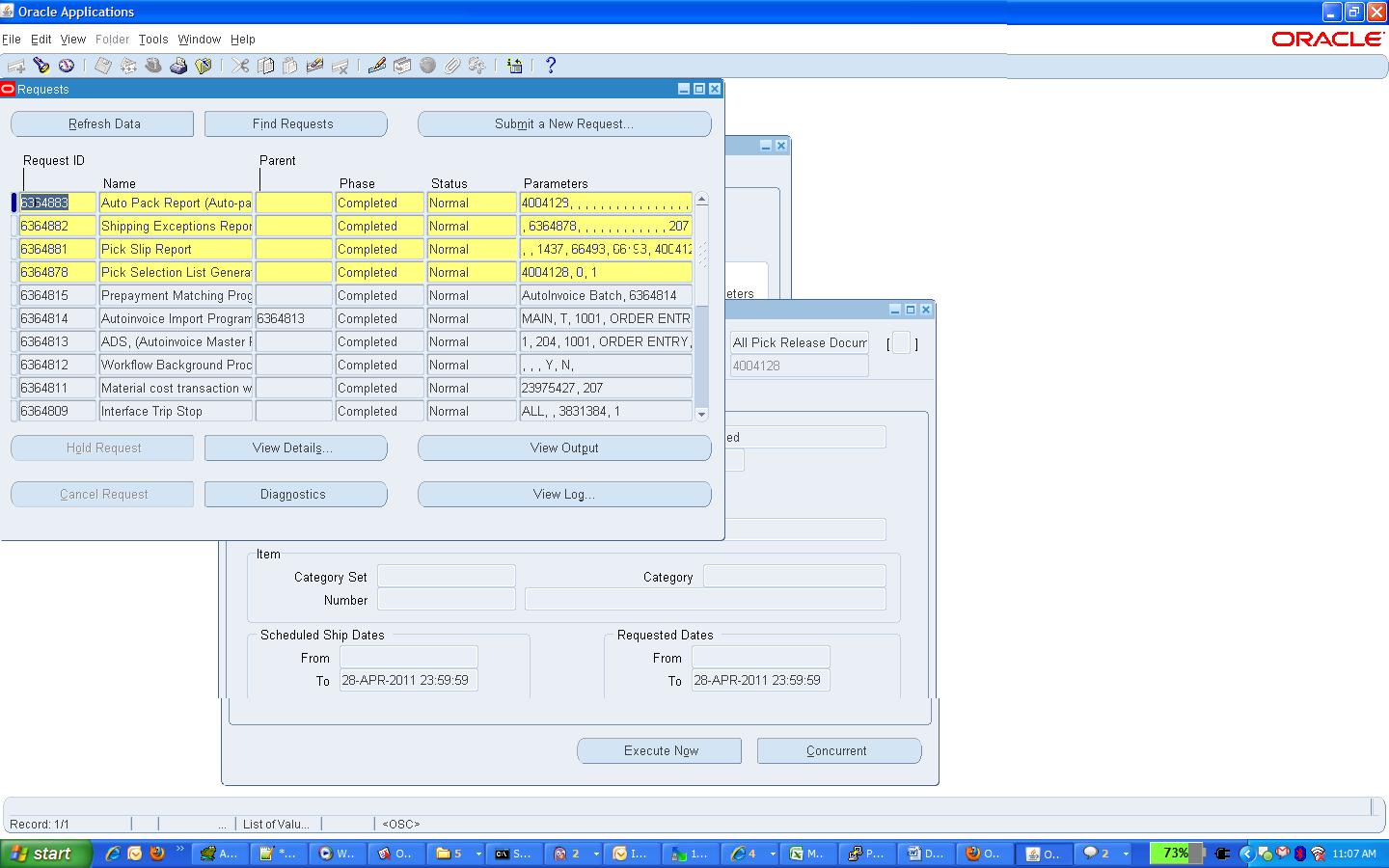
View(M) ->request
Following Four request will submit.
Pick Selection list generation.
Pick slip report.
Shipping exceptions Report.
Auto pack Report

Pick Release is the process of putting reservation on on-hand quantity available in the inventory and pick them for particular sales order.
Pick release can be done from 'Release Sales Order' form or 'Pick release SRS' program can be scheduled in background. In both of these cases all lines of the order gets pick released depending on the Picking rule used. If specific line/s needs to be pick release it can be done from 'Shipping Transaction form. For this case Pick Release is done from 'Release Sales Order' form with Pick Confirm=NO.
Once pick release is done these are the tables get affected:
• If step 3 is not done then MTL_RESERVATIONS gets updated now.
• WSH_NEW_DELIVERIES (one record gets inserted with SOURCE_HEADER_ID= order header ID, STATUS_CODE=OP =>open)
• WSH_DELIVERY_ASSIGNMENTS (DELIVERY_ID gets assigned which comes from WSH_NEW_DELIVERIES)
• WSH_DELIVERY_DETAILS (RELEASED_STATUS ‘S’ ‘submitted for release’)
• MTL_TXN_REQUEST_HEADERS
• MTL_TXN_REQUEST_LINES (LINE_ID goes as TXN_SOURCE_LINE_ID)
• (move order tables. Here request is generated to move item from Source (RM or FG) sub-inventory to staging sub-inventory)
• MTL_MATERIAL_TRANSACTIONS_TEMP (link to above tables through MOVE_ORDER_HEADER_ID/LINE_ID, this table holds the record temporally)
• MTL_SERIAL_NUMBERS_TEMP (if item is serial controlled at receipt then record goes in this table)
• MTL_SERIAL_NUMBERS (enter value in GROUP_MARK_ID )
*In shipping transaction form order status remains "Released to Warehouse" and all the material still remains in source sub-inventory. We need to do Move Order Transaction for this order. Till this no material transaction has been posted to MTL_MATERIAL_TRANSACTIONS
5.Pick Confirm/ Move Order Transaction
Items are transferred from source sub-inventory to staging Sub-inventory. Here material transaction occurs.
Order line status becomes 'Picked' on Sales Order and 'Staged/Pick Confirmed' on Shipping Transaction Form.
• MTL_MATERIAL_TRANSACTIONS_TEMP (Record gets deleted from here and gets posted to MTL_MATERIAL_TRANSACTIONS)
• OE_ORDER_LINES_ALL (FLOW_STATUS_CODE ‘PICKED’ )
• MTL_MATERIAL_TRANSACTIONS (LINE_ID goes as TRX_SOURCE_LINE_ID)
• MTL_TRANSACTION_ACCOUNTS
• WSH_DELIVERY_DETAILS (RELEASED_STATUS becomes ‘Y’ => ‘Released’ )
• WSH_DELIVERY_ASSIGNMENTS
• MTL_ONHAND_QUANTITIES
• MTL_SERIAL_NUMBERS_TEMP (record gets inserted after putting details for the item which are serial controlled at 'Sales order issue')
• MTL_SERIAL_NUMBERS (record gets inserted after putting details for the item which are serial controlled at 'Sales order issue')
* This step can be eliminated if we set Pick Confirm=YES at the time of Pick Release
6.Ship Confirm
Navigation:
Order Management Super User, Vision Operations(USA) responsibility
Shipping-> Transaction

Give Order Number and Click on Find

We can see the line status staged/pick Confirm
Click on Delivery tab
And select ship confirm in actions pop up and GO


Click on OK

Here ship confirm interface program runs in background. Data removed from WSH_NEW_DELIVERIES.

The items on the delivery gets shipped to customer at this stage.
• OE_ORDER_LINES_ALL (FLOW_STATUS_CODE ‘shipped’)
• WSH_DELIVERY_DETAILS (RELEASED_STATUS ‘C’ ‘Shipped’, SERIAL_NUMBER if quantity is ONE)
• WSH_SERIAL_NUMBERS (records gets inserted with the DELIVERY_DETAIL_ID reference, only in case of shipped quantity is two or more)
• MTL_TRANSACTION_INTERFACE
• MTL_MATERIAL_TRANSACTIONS (linked through Transaction source header id)
• MTL_TRANSACTION_ACCOUNTS
• Data deleted from MTL_DEMAND, MTL_RESERVATIONS
• Item deducted from MTL_ONHAND_QUANTITIES
• MTL_SERIAL_NUMBERS_TEMP (records gets deleted from this table)
• MTL_SERIAL_NUMBERS (Serial number stauts gets updated CURRENT_STATUS=4 , 'Issued out of store')
Run Work Flow Back Ground process.
With Porcess deferred to yes and time out to No

Find request

7.Enter Invoice
Open Receivables Vision operations(USA) responsibility
Transaction
Query With Sales Order Number In Reference Field.

After shipping the order the order lines gets eligible to get transfered to RA_INTERFACE_LINES_ALL. Workflow background engine picks those records and post it to RA_INTERFACE_LINES_ALL. This is also called Receivables interface, that mean information moved to accounting area for invoicing details. Invoicing workflow activity transfers shipped item information to Oracle Receivables. At the same time records also goes in the table RA_INTERFACE_SALESCREDITS_ALL which hold details of sales credit for the particular order.
RA_INTERFACE_LINES_ALL (interface table into which the data is transferred from order management) Then Autoinvoice program imports data from this table which get affected into this stage are receivables base table. At the same time records goes in
RA_CUSTOMER_TRX_ALL (CUST_TRX_ID is primary key to link it to TRX_LINES table and TRX_NUMBER is the invoice number)
RA_CUSTOMER_TRX_LINES_ALL (LINE_ATTRIBUTE_1 and LINE_ATTRIBUTE_6 are linked to order number and LINE_ID of the orders)
8.Complete Line
In this stage order line level table get updated with Flow status and open flag.
OE_ORDER_LINES_ALL (FLOW_STATUS_CODE ‘shipped’, OPEN_FLAG “N”)
9.Close Order
This is last step of Order Processing. In this stage only OE_ORDER_LINES_ALL table get updated. These are the table get affected in this step.
OE_ORDER_LINES_ALL (FLOW_STATUS_CODE ‘closed’, OPEN_FLAG “N”)
OE_ORDER_HEADERS_ALL
10. Receipt .
Now We need to receive the Money for the invoice created.
Create Receipt For the Invoice Which is created for your Sales Order.
Navigation :
Open Receivables Vision operations(USA) responsibility
Receipts

Give the Receipt Method, Recipt Number and customer of the invoice For which we going to create receipt.
Click on apply


When the recipt is created then the “AR_CASH_RECEIPTS_ALL” table will gets effected.
Remittence we need to create for the receipt.
Finally we need to reconcile the receipt. It will match the accounts with this Order to Cash Cycle Will complete.
Broadly divided into
1. Order Entry
You can create order from
Order Management Super User, Vision Operations(USA) responsibility
Order, Returns -> Sales Order

When you click on sales order , the following form will open
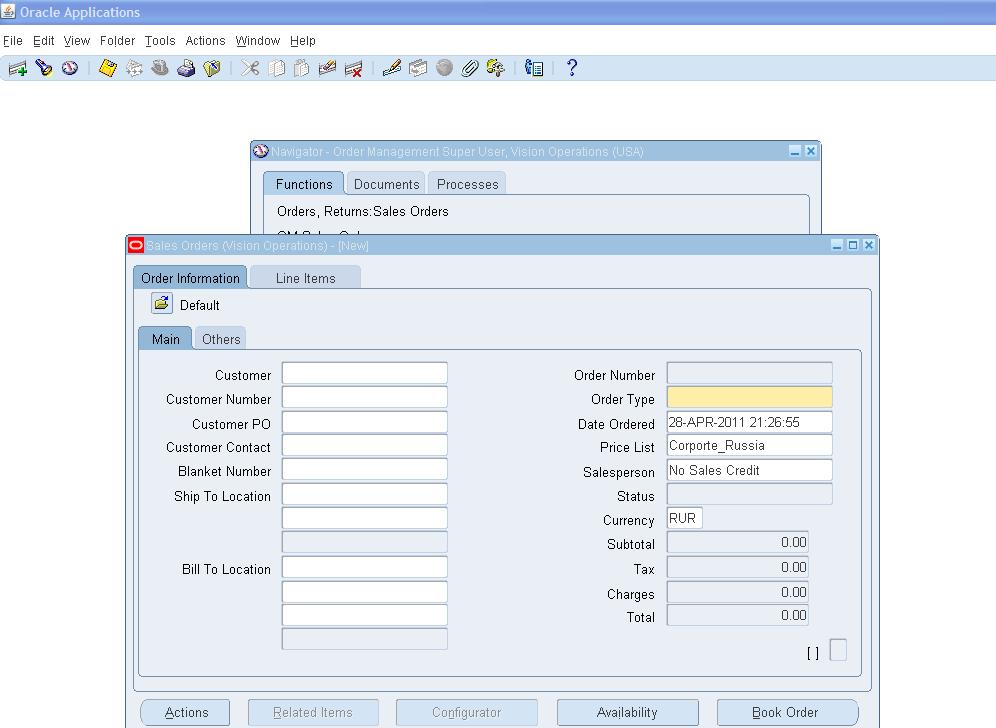
To create sales Order Customer should exist.
Give customer name in the customer field. If that customer is not exist then it will allow you to create customer.

Once customer name entered remaining fields will populate from customer information.
Go to lines TAB
Give the item details to order, click on the AVAILABILITY to check the availability of item.

This is first stage, When the order is entered in the system, it creates a record in order headers and Order Lines table.
• Enter header details: Once you enter details on the order header and save it or move it to lines, record goes to one table OE_ORDER_HEADERS_ALL FLOW_STATUS_CODE = ENTERED, BOOKED_FLAG = N), Primary key=HEADER_ID
•
o No record exist in any other table for this order till now.
• Enter Line details for this order: Enter different item numbers, quantity and other details in line tab. When the record gets saved, it goes to one table. Order header details will be linked with line details by order HEADER_ID. OE_ORDER_LINES_ALL (FLOW_STATUS_CODE = ENTERED, BOOKED_FLAG = N, OPEN_FLAG = Y) Primary key= LINE_ID
2.Order Booking
Click on BOOK ORDER
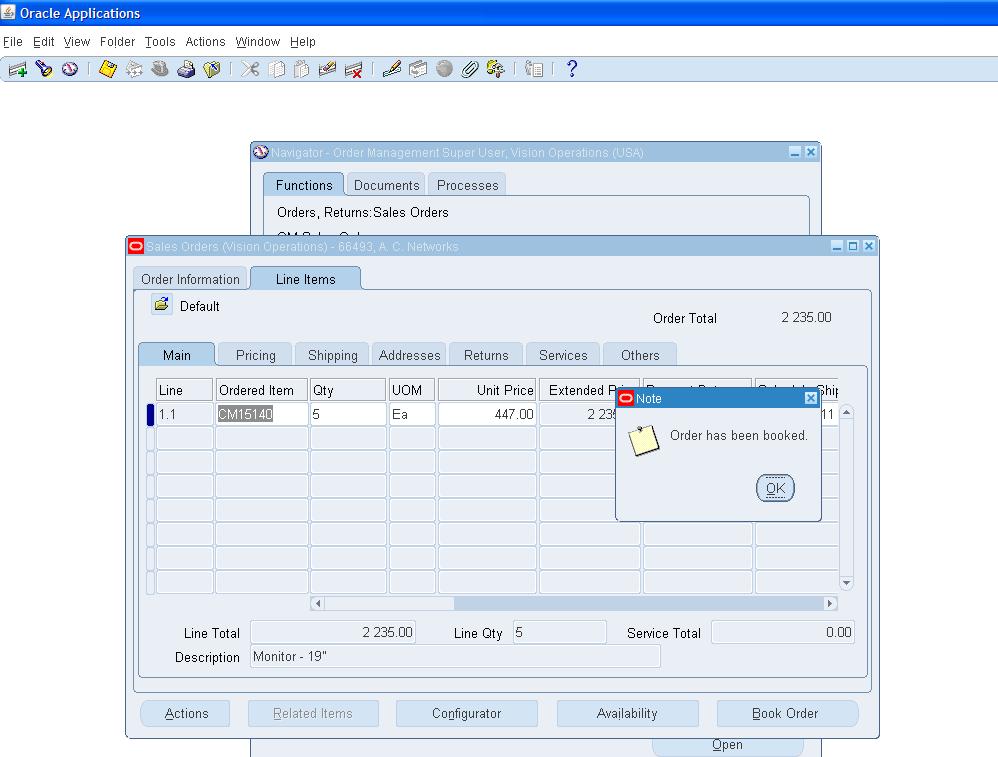
This is next stage, when Order is booked then the Flow status changed from Entered to Booked. At this stage, these below table get affected.
• OE_ORDER_HEADERS_ALL (FLOW_STATUS_CODE as BOOKED, BOOKED_FLAG updated to Y)
• OE_ORDER_LINES_ALL (FLOW_STATUS_CODE as AWAITING_SHIPPING, BOOKED_FLAG updated Y)
• WSH_DELIVERY_DETAILS (DELIVERY_DETAIL_ID is assigned here, RELEASED_STATUS ‘R’ ready to release, LINE_ID comes as SOURCE_LINE_ID)
• WSH_DELIVERY_ASSIGNMENTS (DELIVERY_ASSIGNMENT_ID is assigned for DELIVERY_DETAIL_ID present in WSH_DELIVERY_DETAILS, DELIVERY_ID remains blank till this stage)
*In shipping transaction form order status remains "Ready to Release".
At the same time, Demand interface program runs in background And insert into inventory tables MTL_DEMAND, here LINE_ID come as a reference in DEMAND_SOURCE_LINE
3. Reservation
This step is required for doing reservations SCHEDULE ORDER PROGRAM runs in the background and quantities are reserved. Once this program get successfully get completed, the MTL_DEMAND and MTL_RESERVATIONS table get updated. LINE_ID gets updated in DEMAND_SOURCE_LINE_ID in both the tables.
4. Pick Release
Release the Sales order for Shipment of the Item
Navigation:
Order Management Super User, Vision Operations(USA) responsibility
Shipping->; Release Sales Order
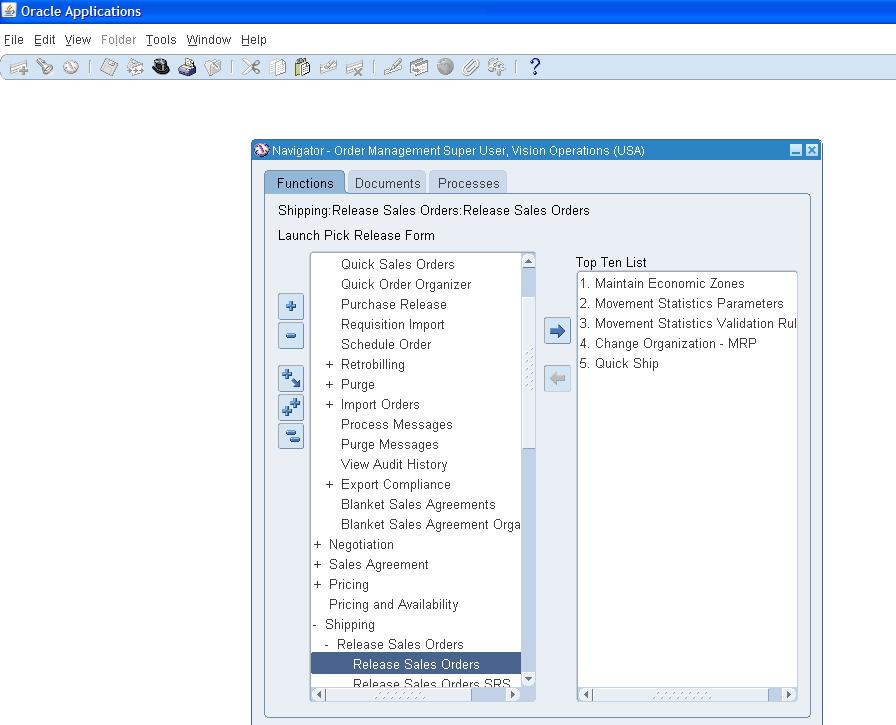
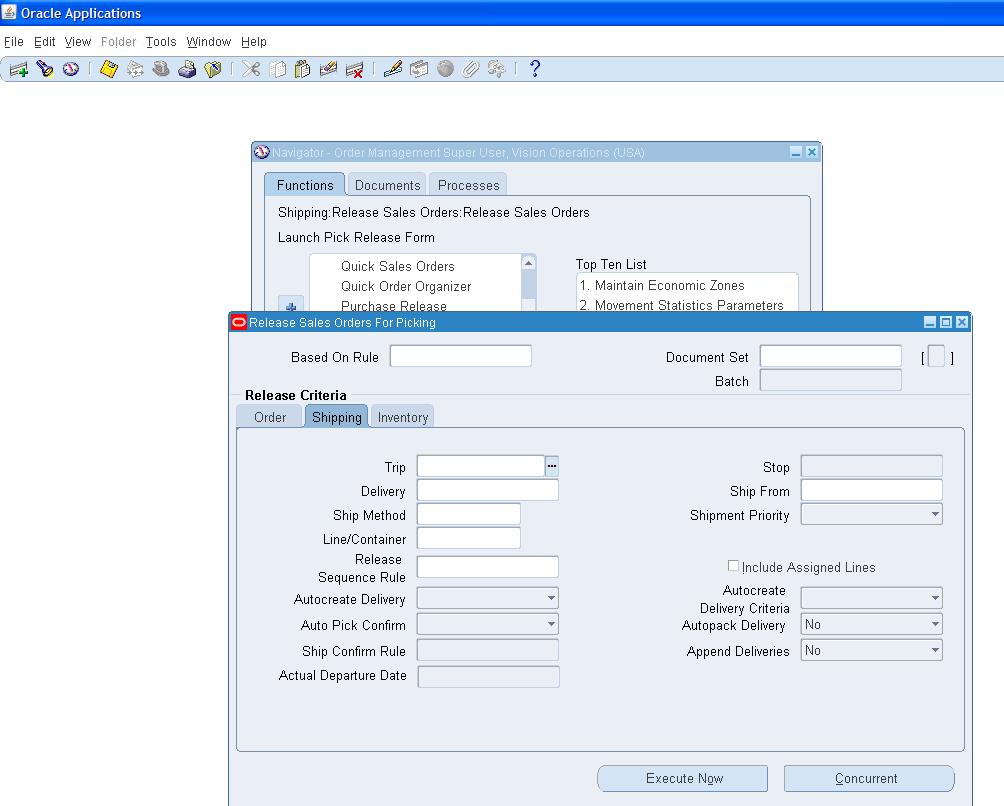
Give the Order number and go to shipping tab
Give ship from field the remaining fields will populate

Make sure Auto Create Delivery set to yes and
Auto Pick Conform set to YES.
If Auto Pick Confirm is not set to YES then we transact the moveorder of this sales Order Manually
Click on save . One program will fire in the Backend.
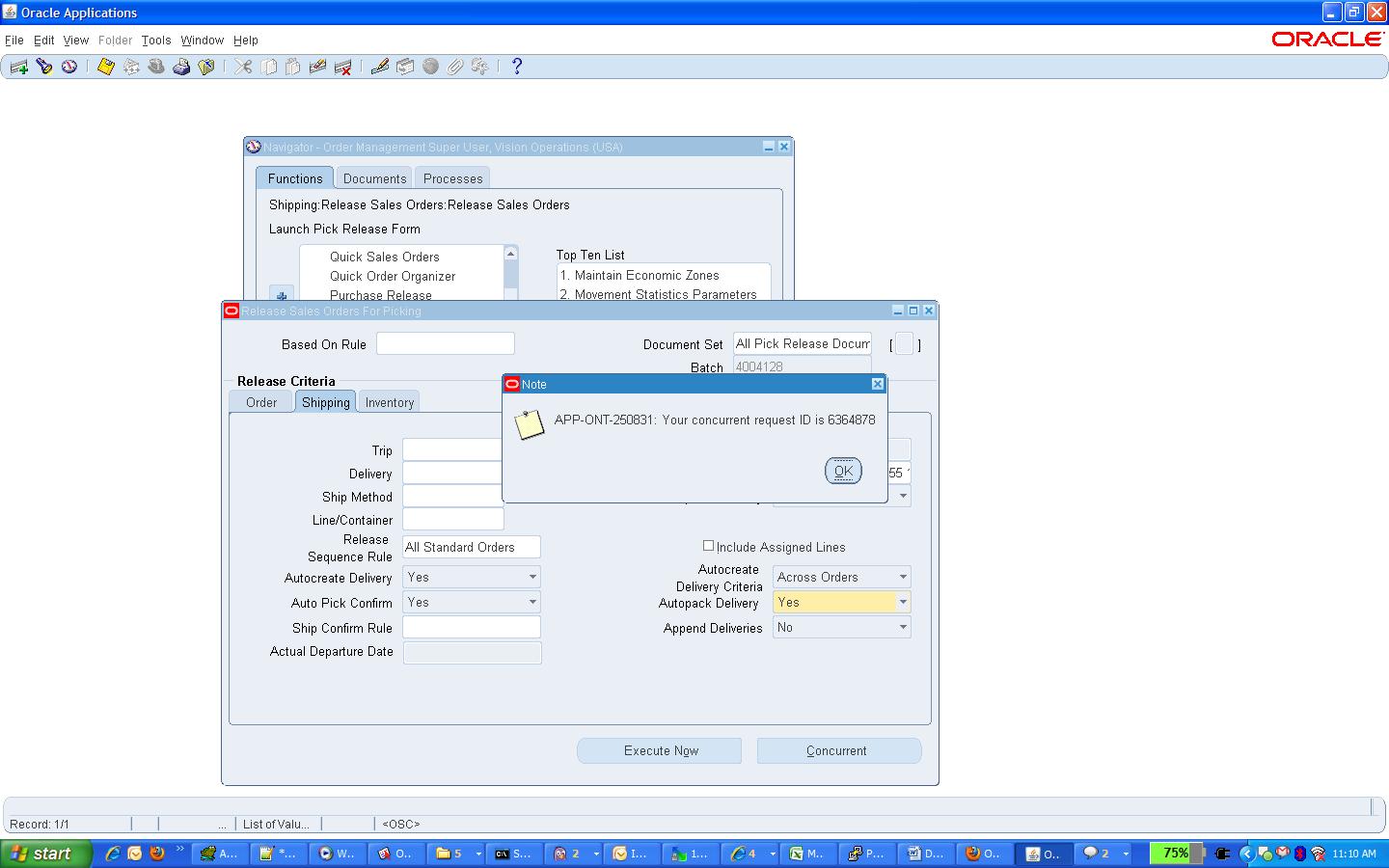
Move for this sales Order will be creted and transacted if auto pick conform set to yes.
Otherwise we need to transact the move Order manually.
The items will transfer from source sub-inventory to staging sub-inventory.
GO TO
View(M) ->request
Following Four request will submit.
Pick Selection list generation.
Pick slip report.
Shipping exceptions Report.
Auto pack Report
Pick Release is the process of putting reservation on on-hand quantity available in the inventory and pick them for particular sales order.
Pick release can be done from 'Release Sales Order' form or 'Pick release SRS' program can be scheduled in background. In both of these cases all lines of the order gets pick released depending on the Picking rule used. If specific line/s needs to be pick release it can be done from 'Shipping Transaction form. For this case Pick Release is done from 'Release Sales Order' form with Pick Confirm=NO.
Once pick release is done these are the tables get affected:
• If step 3 is not done then MTL_RESERVATIONS gets updated now.
• WSH_NEW_DELIVERIES (one record gets inserted with SOURCE_HEADER_ID= order header ID, STATUS_CODE=OP =>open)
• WSH_DELIVERY_ASSIGNMENTS (DELIVERY_ID gets assigned which comes from WSH_NEW_DELIVERIES)
• WSH_DELIVERY_DETAILS (RELEASED_STATUS ‘S’ ‘submitted for release’)
• MTL_TXN_REQUEST_HEADERS
• MTL_TXN_REQUEST_LINES (LINE_ID goes as TXN_SOURCE_LINE_ID)
• (move order tables. Here request is generated to move item from Source (RM or FG) sub-inventory to staging sub-inventory)
• MTL_MATERIAL_TRANSACTIONS_TEMP (link to above tables through MOVE_ORDER_HEADER_ID/LINE_ID, this table holds the record temporally)
• MTL_SERIAL_NUMBERS_TEMP (if item is serial controlled at receipt then record goes in this table)
• MTL_SERIAL_NUMBERS (enter value in GROUP_MARK_ID )
*In shipping transaction form order status remains "Released to Warehouse" and all the material still remains in source sub-inventory. We need to do Move Order Transaction for this order. Till this no material transaction has been posted to MTL_MATERIAL_TRANSACTIONS
5.Pick Confirm/ Move Order Transaction
Items are transferred from source sub-inventory to staging Sub-inventory. Here material transaction occurs.
Order line status becomes 'Picked' on Sales Order and 'Staged/Pick Confirmed' on Shipping Transaction Form.
• MTL_MATERIAL_TRANSACTIONS_TEMP (Record gets deleted from here and gets posted to MTL_MATERIAL_TRANSACTIONS)
• OE_ORDER_LINES_ALL (FLOW_STATUS_CODE ‘PICKED’ )
• MTL_MATERIAL_TRANSACTIONS (LINE_ID goes as TRX_SOURCE_LINE_ID)
• MTL_TRANSACTION_ACCOUNTS
• WSH_DELIVERY_DETAILS (RELEASED_STATUS becomes ‘Y’ => ‘Released’ )
• WSH_DELIVERY_ASSIGNMENTS
• MTL_ONHAND_QUANTITIES
• MTL_SERIAL_NUMBERS_TEMP (record gets inserted after putting details for the item which are serial controlled at 'Sales order issue')
• MTL_SERIAL_NUMBERS (record gets inserted after putting details for the item which are serial controlled at 'Sales order issue')
* This step can be eliminated if we set Pick Confirm=YES at the time of Pick Release
6.Ship Confirm
Navigation:
Order Management Super User, Vision Operations(USA) responsibility
Shipping-> Transaction

Give Order Number and Click on Find
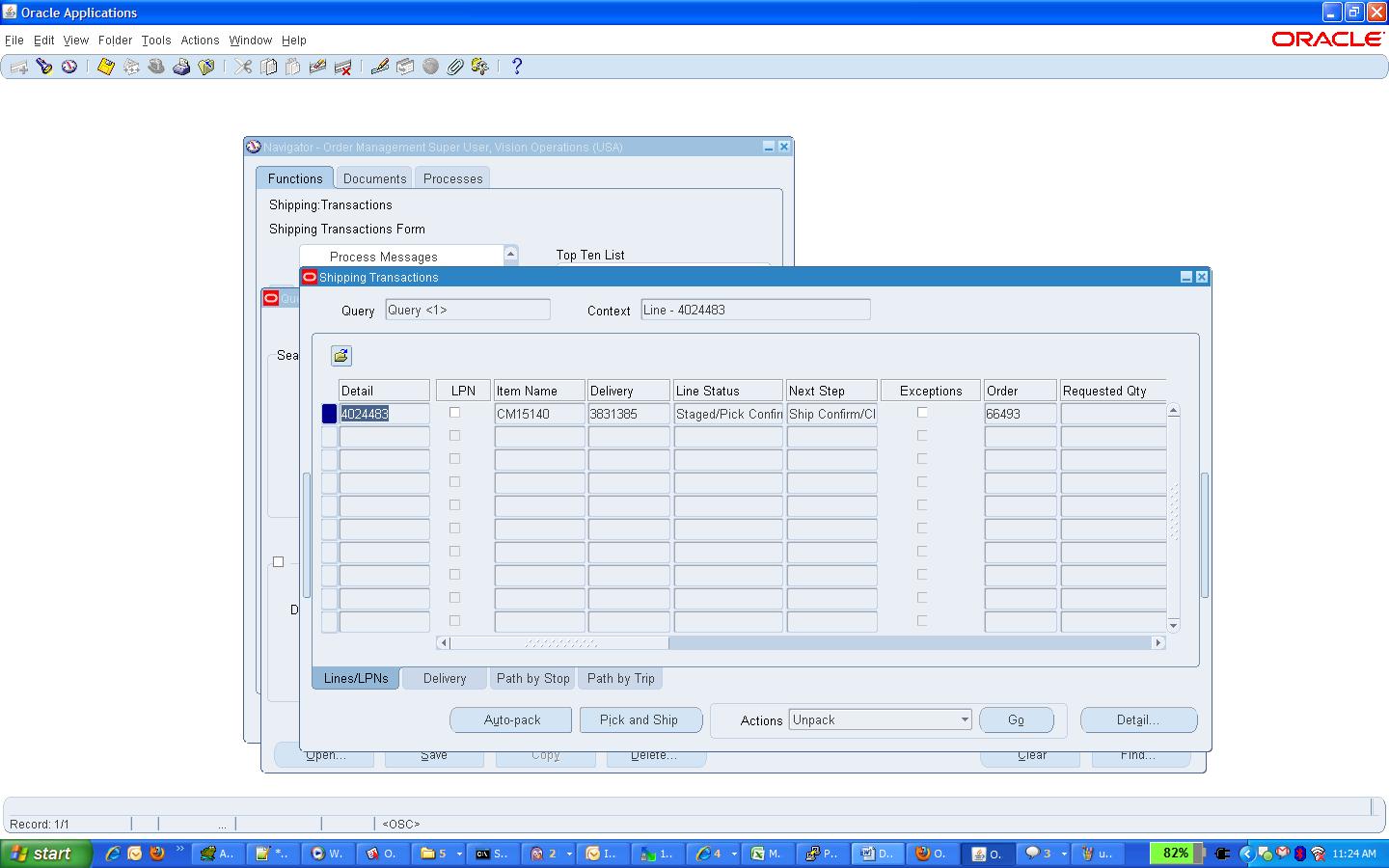
We can see the line status staged/pick Confirm
Click on Delivery tab
And select ship confirm in actions pop up and GO

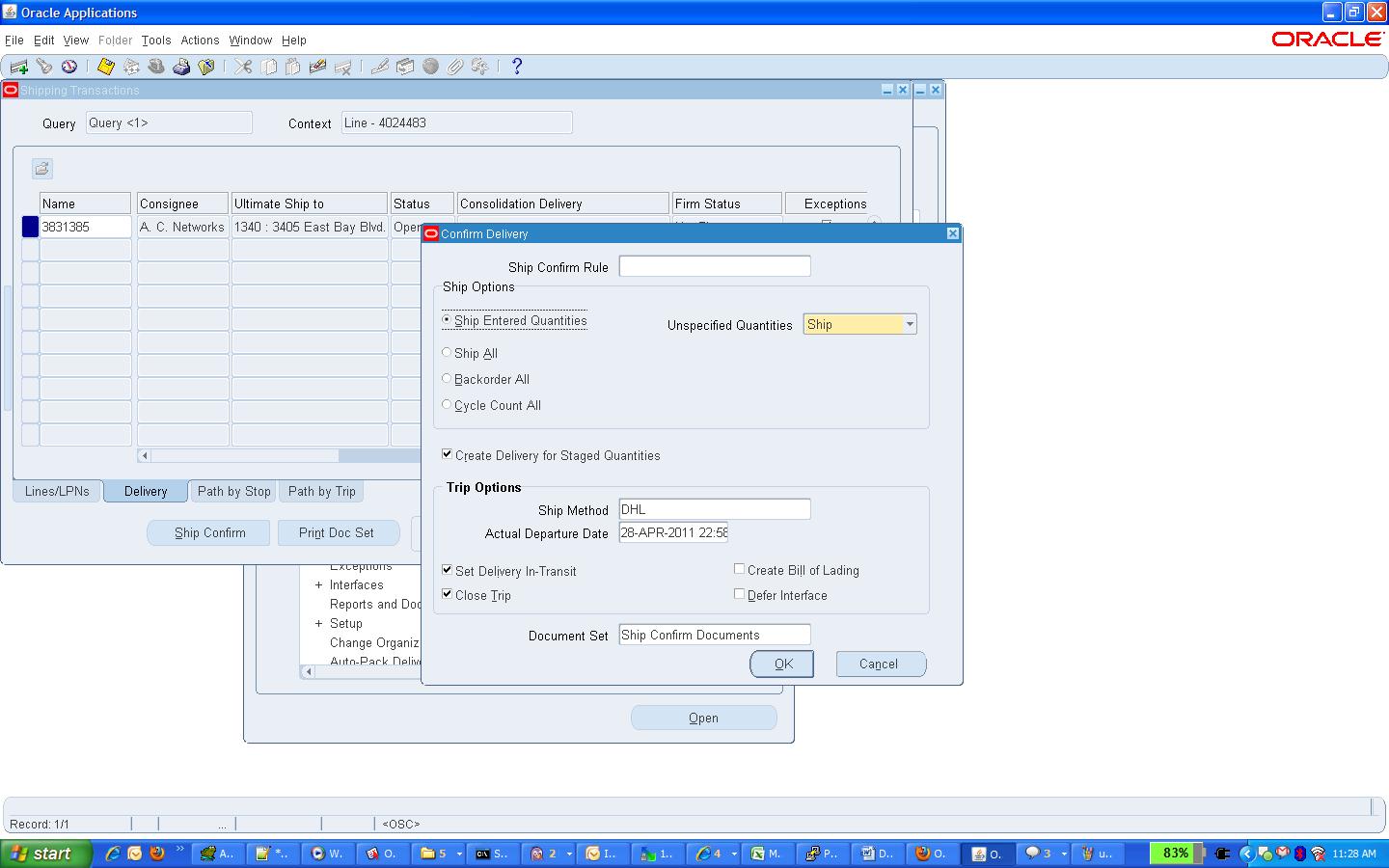
Click on OK
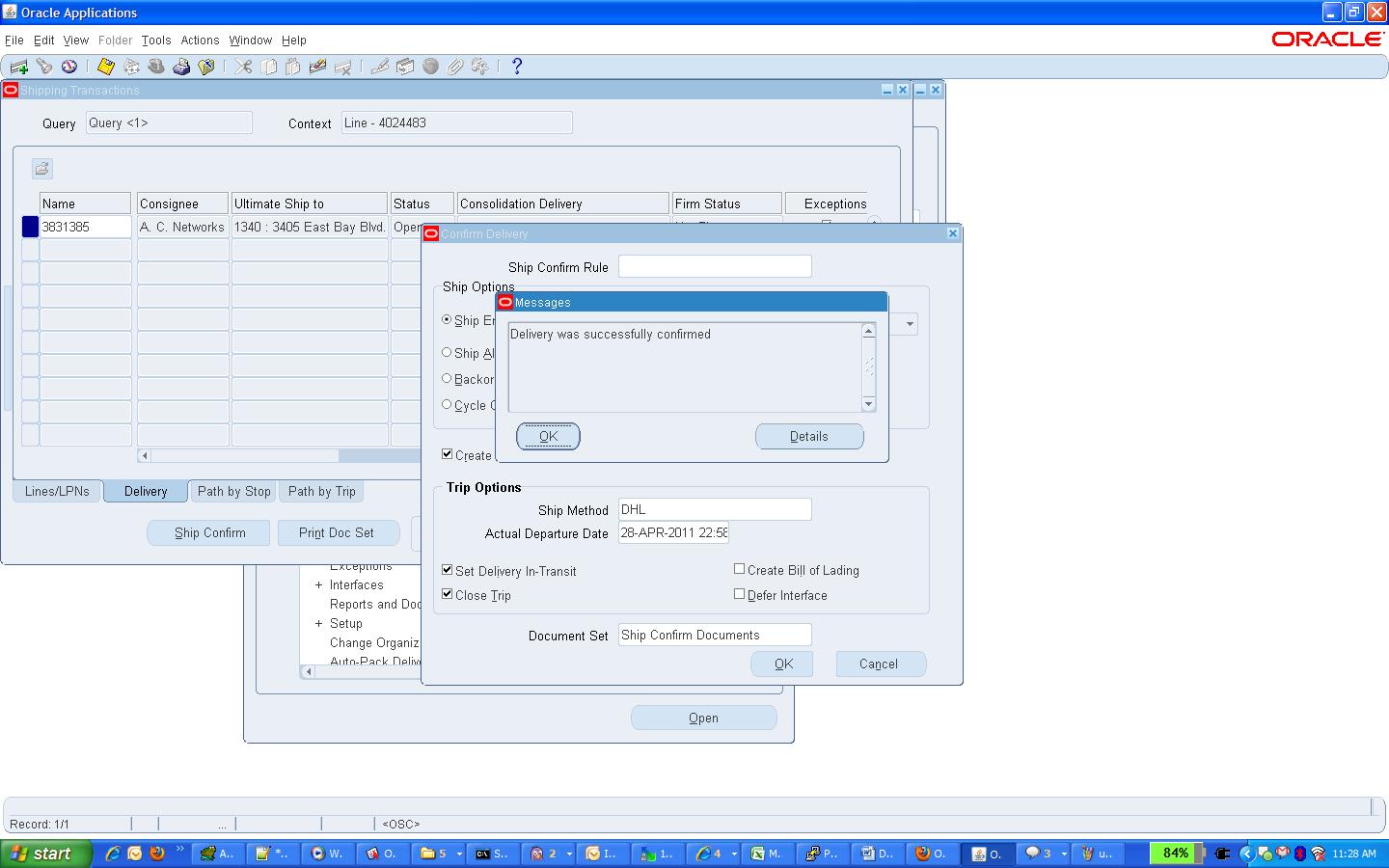
Here ship confirm interface program runs in background. Data removed from WSH_NEW_DELIVERIES.

The items on the delivery gets shipped to customer at this stage.
• OE_ORDER_LINES_ALL (FLOW_STATUS_CODE ‘shipped’)
• WSH_DELIVERY_DETAILS (RELEASED_STATUS ‘C’ ‘Shipped’, SERIAL_NUMBER if quantity is ONE)
• WSH_SERIAL_NUMBERS (records gets inserted with the DELIVERY_DETAIL_ID reference, only in case of shipped quantity is two or more)
• MTL_TRANSACTION_INTERFACE
• MTL_MATERIAL_TRANSACTIONS (linked through Transaction source header id)
• MTL_TRANSACTION_ACCOUNTS
• Data deleted from MTL_DEMAND, MTL_RESERVATIONS
• Item deducted from MTL_ONHAND_QUANTITIES
• MTL_SERIAL_NUMBERS_TEMP (records gets deleted from this table)
• MTL_SERIAL_NUMBERS (Serial number stauts gets updated CURRENT_STATUS=4 , 'Issued out of store')
Run Work Flow Back Ground process.
With Porcess deferred to yes and time out to No

Find request

7.Enter Invoice
Open Receivables Vision operations(USA) responsibility
Transaction
Query With Sales Order Number In Reference Field.

After shipping the order the order lines gets eligible to get transfered to RA_INTERFACE_LINES_ALL. Workflow background engine picks those records and post it to RA_INTERFACE_LINES_ALL. This is also called Receivables interface, that mean information moved to accounting area for invoicing details. Invoicing workflow activity transfers shipped item information to Oracle Receivables. At the same time records also goes in the table RA_INTERFACE_SALESCREDITS_ALL which hold details of sales credit for the particular order.
RA_INTERFACE_LINES_ALL (interface table into which the data is transferred from order management) Then Autoinvoice program imports data from this table which get affected into this stage are receivables base table. At the same time records goes in
RA_CUSTOMER_TRX_ALL (CUST_TRX_ID is primary key to link it to TRX_LINES table and TRX_NUMBER is the invoice number)
RA_CUSTOMER_TRX_LINES_ALL (LINE_ATTRIBUTE_1 and LINE_ATTRIBUTE_6 are linked to order number and LINE_ID of the orders)
8.Complete Line
In this stage order line level table get updated with Flow status and open flag.
OE_ORDER_LINES_ALL (FLOW_STATUS_CODE ‘shipped’, OPEN_FLAG “N”)
9.Close Order
This is last step of Order Processing. In this stage only OE_ORDER_LINES_ALL table get updated. These are the table get affected in this step.
OE_ORDER_LINES_ALL (FLOW_STATUS_CODE ‘closed’, OPEN_FLAG “N”)
OE_ORDER_HEADERS_ALL
10. Receipt .
Now We need to receive the Money for the invoice created.
Create Receipt For the Invoice Which is created for your Sales Order.
Navigation :
Open Receivables Vision operations(USA) responsibility
Receipts
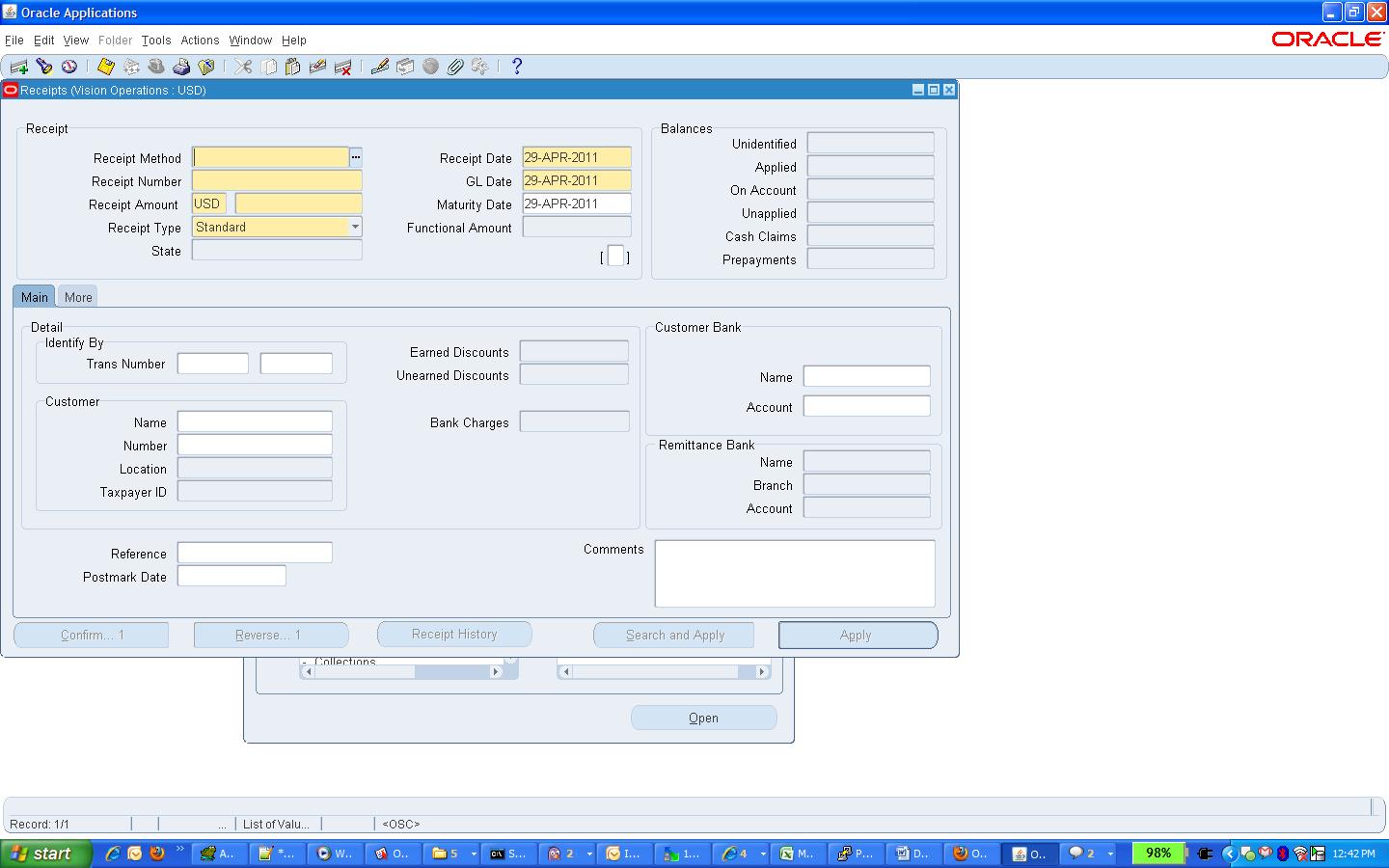
Give the Receipt Method, Recipt Number and customer of the invoice For which we going to create receipt.
Click on apply
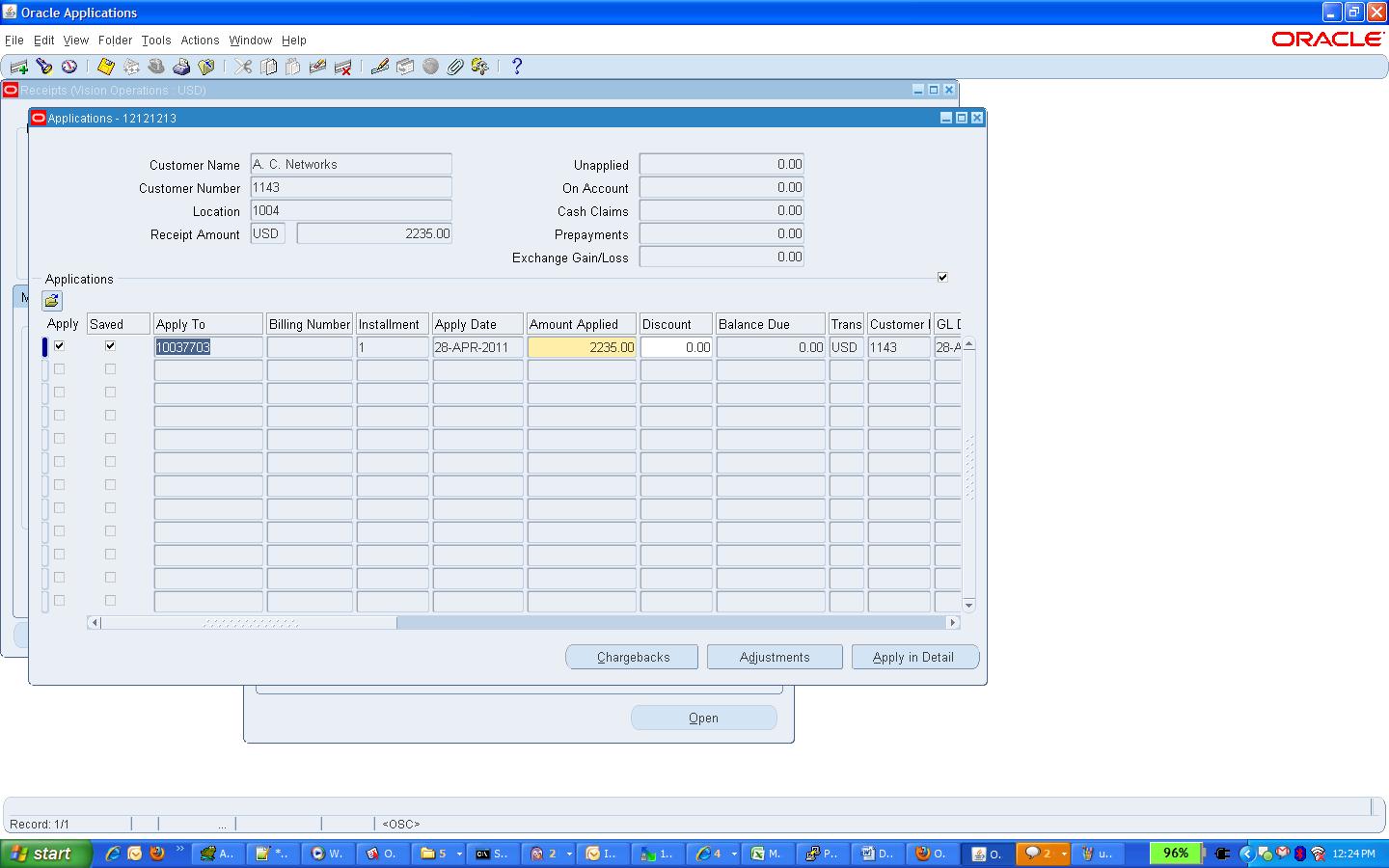
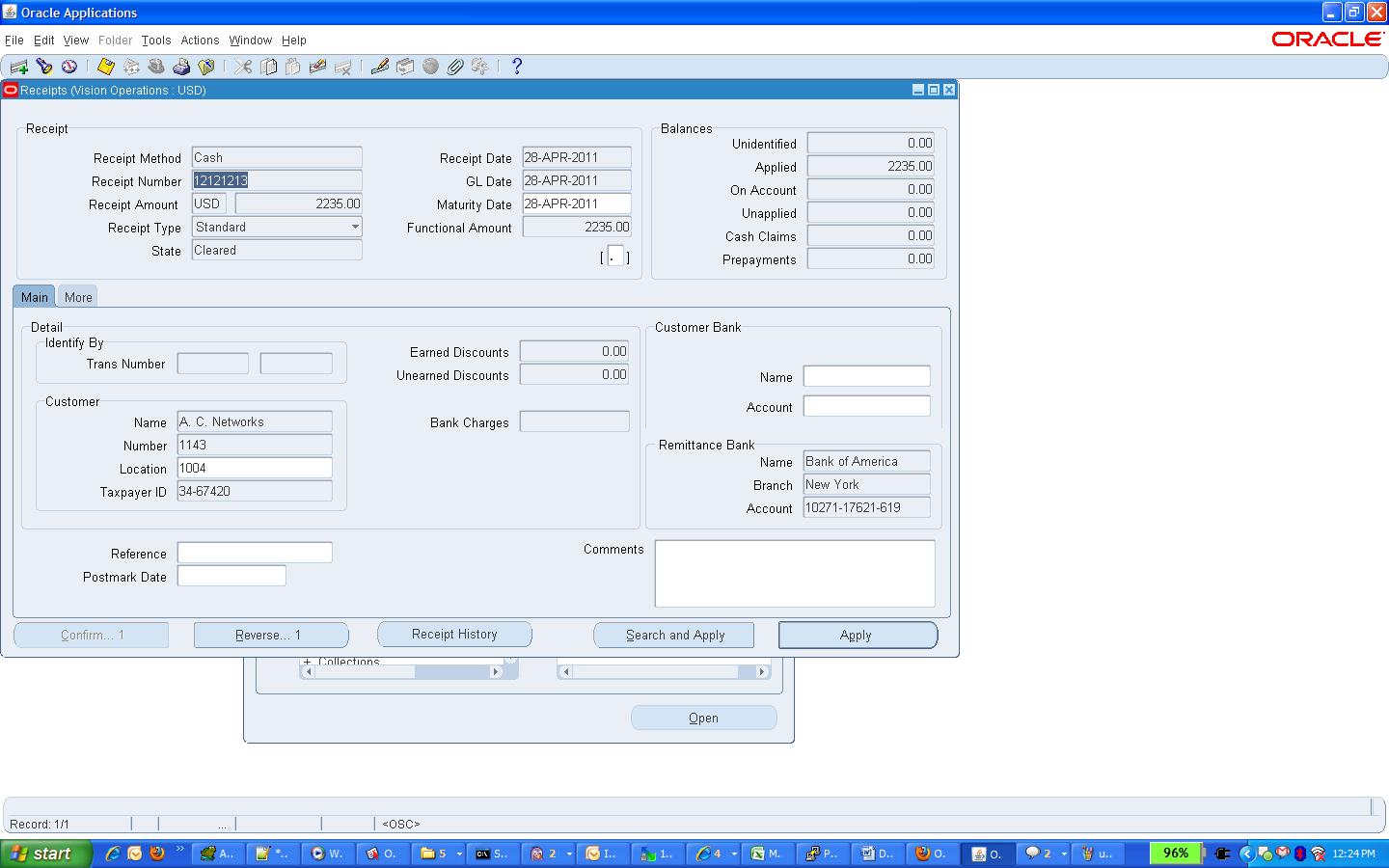
When the recipt is created then the “AR_CASH_RECEIPTS_ALL” table will gets effected.
Remittence we need to create for the receipt.
Finally we need to reconcile the receipt. It will match the accounts with this Order to Cash Cycle Will complete.
Business Group: A Business/Corporate group is a collection of parent and subsidiary corporations/companies that function as a single economic entity through a common source of control.
Business Group can be defined as a group of companies that does business in different markets under common administrative or financial control whose members are linked by relations of interpersonal trust on the bases of similar personal ethnic or commercial background a business group. One method of defining a group is as a cluster of legally distinct firms with a managerial relationship. The relationship between the firms in a group may be formal or informal.
The Business Group represents the highest level in the organization structure, such as the consolidated enterprise, a major division, or an operation company.
Legal Entity: A legal entity has legal capacity to enter into agreements or contracts, assume obligations, incur and pay debts, sue and be sued in its own right, and to be held responsible for its actions. A legal company for which you prepare fiscal or tax reports. You assign tax identifiers and other legal entity information to this type of organization and it is distinct and independent of those persons who from time to time are its members.
Operating Unit: An organization that uses Oracle subledgers, such as Oracle Cash Management, Order Management and Shipping Execution, Oracle Payables, Oracle Purchasing, Oracle Receivables, and related products. It may be a sales office, a division, or a department. Operating units are not associated with legal entities. Operating units are assigned to ledgers and a default legal context. Information is secured by operating unit for these applications using responsibilities. Each user can access, process, and report on data only for the operating units assigned to the "MO: Operating Unit" or "MO: Security Profile" profile option. The "MO: Operating Unit" profile option only provides access to one operating unit. The "MO: Security Profile" provides access to multiple operating units from a single responsibility.
Inventory Organization: An organization for which you track inventory transactions and balances, and/or an organization that manufactures or distributes products. Examples include (but are not limited to) manufacturing plants, warehouses, distribution centers, and sales offices. The following applications secure information by inventory organization: Oracle Inventory, Bills of Material, Engineering, Work in Process, Master Scheduling/MRP, Capacity, and Purchasing receiving functions. To run any of these applications, you must choose an organization that has been classified as an inventory organization.
HR Organization: HR organizations represent the basic work structure of any enterprise. They usually represent the functional management, or reporting groups that exist within a business group. In addition to these internal organizations, you can define other organizations for tax and government reporting purposes, or for third party payments.
Ledger: A ledger is the principal book for recording transactions like revenues, expenses, accounts receivable and accounts payable.
